A clear record of how you have felt, ready for the doctor.

Sympli Health Logger, or Sympli for short, is a health journal for iPhone. Log symptoms, temperature, mood and weight for yourself and for your kids, then share a clean record when you see the doctor. No more trying to remember when it started.

Coming soon for iPhone
The Sympli home screen: today's entries for three family members and a week at a glance.

Three steps, no fuss

Logging should feel like jotting a note, not filling in a form.

  1. 1

    Log what is happening

    Pick a symptom, a temperature, a mood or a weight. Add the severity, a note or a photo if it helps. Set the time, or leave it as now.

    • Symptoms
    • Temperature
    • Mood
    • Weight
  2. 2

    Keep everyone separate

    Add a profile for each child or family member. Every entry belongs to one person, so a parent can look back at each child on their own.

  3. 3

    Share a clean record

    Pick a date range and export the entries as a PDF or a CSV file. Hand it to the doctor, or send it before the appointment.

    • PDF
    • CSV

See it in the app

A quick look at logging, family profiles and the record you share. The people and entries shown are sample data.

  • The log screen for a symptom, with fields for who it is for, the date, symptoms, temperature and severity.
    Log a symptom in a few taps
  • The family members screen, listing two children with their ages and an Add a family member button.
    A profile for each family member
  • The history screen: a searchable list of entries grouped by day, each with severity and temperature.
    A searchable, dated history
  • The export sheet, with a choice between a CSV spreadsheet and a PDF report.
    Export as PDF or CSV
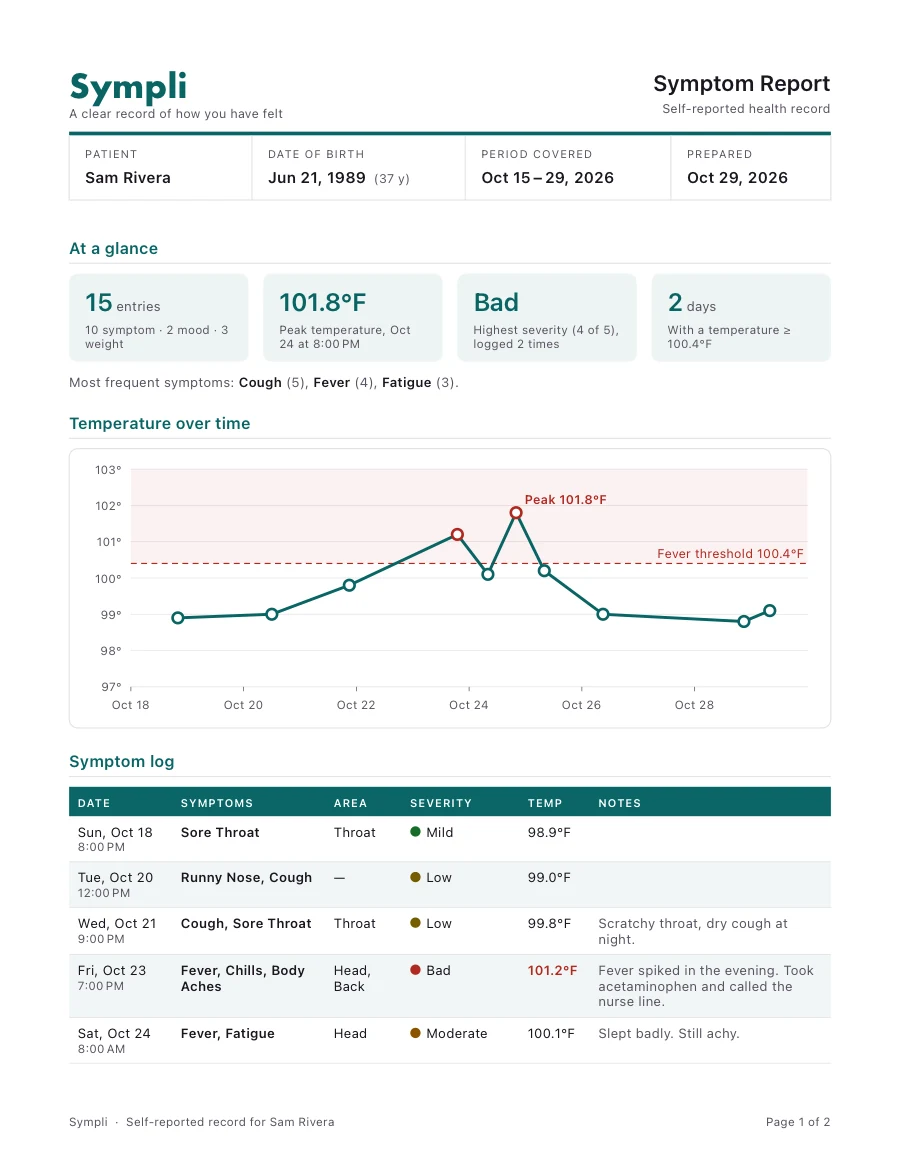
The first page of a sample Sympli PDF symptom report: a summary of entries, peak temperature and highest severity, a temperature chart and a dated symptom log.

A report the doctor can read at a glance

The PDF opens with a short summary: how many entries, the peak temperature, the highest severity and the most frequent symptoms. Below it are a temperature chart and a dated symptom log, with optional space for notes.

Why I made this

I have had this app idea for many years, since I was in college. It took becoming a parent for me to finally make the time to build it.

My son was constantly getting ear infections, and we would take him to his pediatrician to get checked out. I could never remember exactly when he started to feel sick. I kept his symptoms in a notes app, and it was very disorganized. Worst of all, I couldn’t remember whether the ear infection kept happening in the same ear. Fortunately, the doctor had these records, but as a parent I felt I needed to have my own records too, to document things for myself and to help the doctor.

I created this to track my own symptoms as well as my son’s, so we can better keep track of our health and see whether there are any trends.

Your health record stays yours

Health notes are personal, and children’s notes even more so. Sympli is built to keep them that way.

Read the privacy policy
  • On your iPhone by default

    Entries are saved on your device. There is no Sympli account to create and no Sympli server holding your journal.

  • iCloud backup is your choice

    Turn it on to back up and sync across your devices. It uses your own private iCloud, and it is off until you switch it on.

  • Delete everything, any time

    One option in Settings erases your entries, profiles and photos from the device and from your iCloud copy.

  • Never sold, never used for ads

    Your health data is not sold and not used for advertising.

Questions, answered

Who is Sympli for?

Anyone who wants a tidy record of their health, and parents in particular. You can keep your own journal and add a profile for each child.

Does Sympli Health Logger give medical advice?

No. Sympli Health Logger is a record-keeping tool. It does not diagnose or recommend treatment. If you are worried about your health or your child’s, talk to a doctor or call your local emergency number.

Where is my data stored?

On your iPhone. If you choose to turn on iCloud sync, a copy is also kept in your own private iCloud so it can be restored on a new phone. See the privacy policy for details.

Do I need an account?

You sign in with Apple, so there is no new password to remember.

How do I share a record with the doctor?

Filter your history to the dates you want, then export it as a PDF or a CSV file and share it from your phone.

What does it cost?

To be determined, but there will be a free version at minimum.

Is there an Android version?

Not at the moment. Sympli is built for iPhone.

Coming soon for iPhone

Sympli Health Logger will be on the App Store soon.